Video Monitoring
Using Suitest, you can monitor the streams and video content on your testing devices 24/7. Suitest logs all the events and keeps them for 30 days.
What can Suitest monitor?
Suitest can notify you about various issues:
-
Black screen
-
Frozen screen
-
Blockiness
-
Blurriness
-
Low quality
Setting up video monitoring
To start/stop a monitoring session Manage Devices permission is required.
As prerequisites, you need:
-
An Android mobile phone with Suitest Camera app paired with your account
-
A testing device running video content
-
Monitoring sessions included in your subscription
To set up the video monitoring:
-
Assign the Suitest Camera app instance to your testing device
-
Make sure that the device is running the corresponding video content
-
Go to device details modal
-
Click on the Monitor button at the bottom
-
In the newly opened modal, select the issues you want to monitor
-
Click Start monitoring
Monitoring log page
The Suitest monitoring service logs all detected video issues.
Page layout
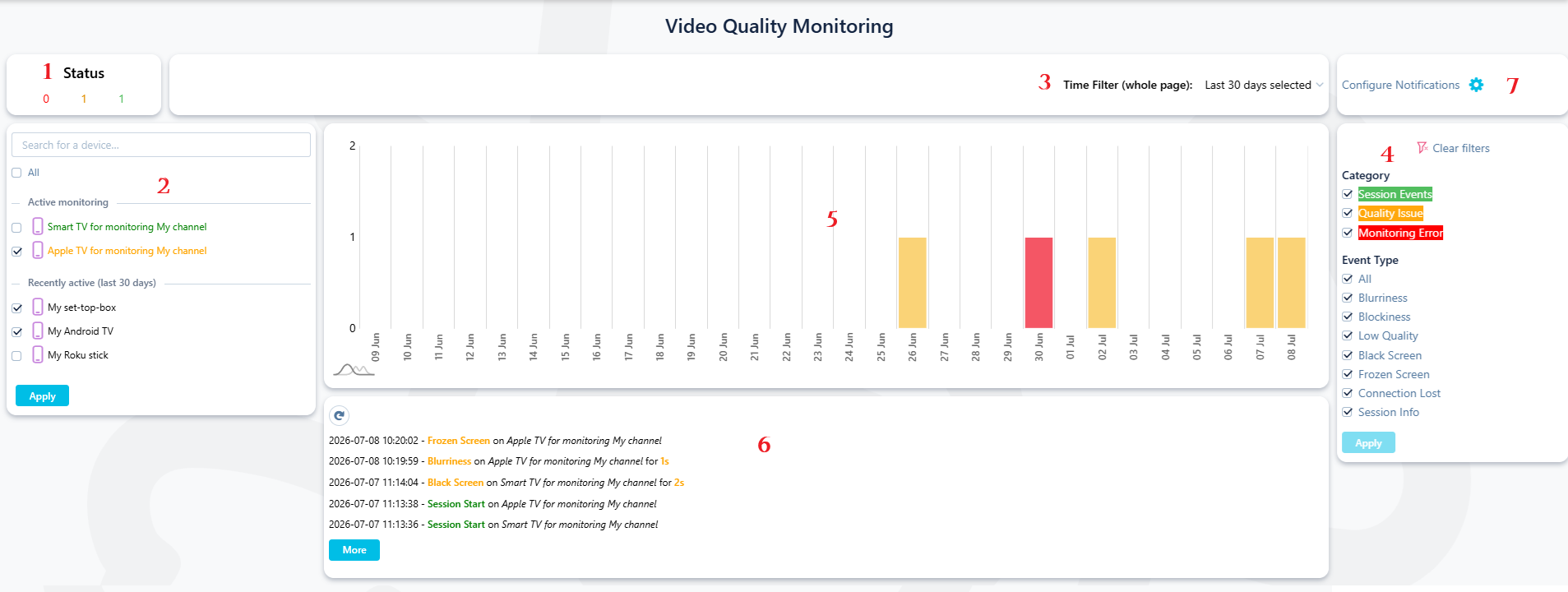
#1 Status
Displays the number of devices running video monitoring, split into 3 categories:
- Devices without any issues: green
- Devices with a video issue: orange
- Devices with a monitoring issue (monitoring service is not running properly): red
#2 Device filter
Inside the filter, all your devices are listed in categories based on the event log content:
-
Devices that are currently actively monitored
-
Devices that were monitored in the last 30 days and have items in the event log
#3 Time filter
You can select a time period to filter the timeline chart as well as the event log.
#4 Event filter
You can select event types to filter the timeline chart as well as the event log.
#5 Timeline chart
Displays a timeline based on the selected time filter, split into time periods. For each period, you can see how many devices were monitored and the worst status during that time period:
- no issues: green
- video issues detected: orange
- issue with the monitoring service: red
All filters (device, time and event) are reflected in the chart.
#6 Event log
Lists all events related to the monitoring sessions (start, end, error) and video issues, ordered from the latest one.
All filters (device, time and event) are reflected inside the list.
#7 Notifications
Suitest can notify you about video issues. See notifications page for more info.
Setting up threshold values
Inside each Suitest app installation, you can set up the values in the app settings.